> For the complete documentation index, see [llms.txt](https://stepsize.gitbook.io/stepsize-documentation/llms.txt). Markdown versions of documentation pages are available by appending `.md` to page URLs; this page is available as [Markdown](https://stepsize.gitbook.io/stepsize-documentation/team-and-collaborators/using-stepsize-as-a-team.md).
# Using Stepsize as a Team
Stepsize transforms the way your team works by linking issues to code. With Stepsize, you get technical issue tracking, collaboration and execution *in your IDE*.
## **Stepsize for code quality and knowledge management**
Creating issues directly in your PM tool (like Jira) interrupts work. At the same time, conversations about issues often lack context.
When you use Stepsize...
1. Engineers track more issues, because issue tracking happens natively in the codebase
2. Engineers are aware of existing issues, because they see issues as inline innotations
3. Issues are much easier to prioritise, because they innately have context and are directly linked to code.
Engineering teams which adopt Stepsize...
* [x] **Create 10x more issues** 👉 Visibility
* [x] **View 20x more issues** 👉 Awareness
* [x] **Resolve 10x more issues** 👉 Actionability
### **Using Stepsize with a process**
Getting the most out of Stepsize requires both the **tool** and the right **process**.
The underlying philosophy behind driving behavioural change across a team is, in a nutshell, this:
> ***Track one, fix one.***
### **Getting started with *****track one, fix one***
To start building good habits, we suggest starting with an experiment.
1. Select a time period for your experiment. This could be 1-2 weeks or a sprint, for example.
2. Get on the same page. Hold a meeting to kick off the experiment.
3. **Track one**. Each engineer documents at least one new issue over the time period.
4. **Fix one**. Collectively agree on an issue to resolve as a team. We suggest holding a short meeting to do this.
### **Reviewing the experiment**
* **Visibility** - How many issues got created? How does this number compare to your normal number when using your standard issue tracker alone?
* **Awareness** - How many issues were viewed? How does this compare?
* **Actionability** - How many issues did you resolve? How easy were they to prioritise?
## **Stepsize for sprint planning and delivery**
Stepsize is a powerful tool which closes feedback loops throughout your software development cycle. Let's look at a couple of use cases.
### **Backlog refinement**
High issue quality is a prerequisite for successful backlog refinement. Issues loaded with context can be prioritised effectively.
Stepsize issues are innately loaded with context because they are linked to code.
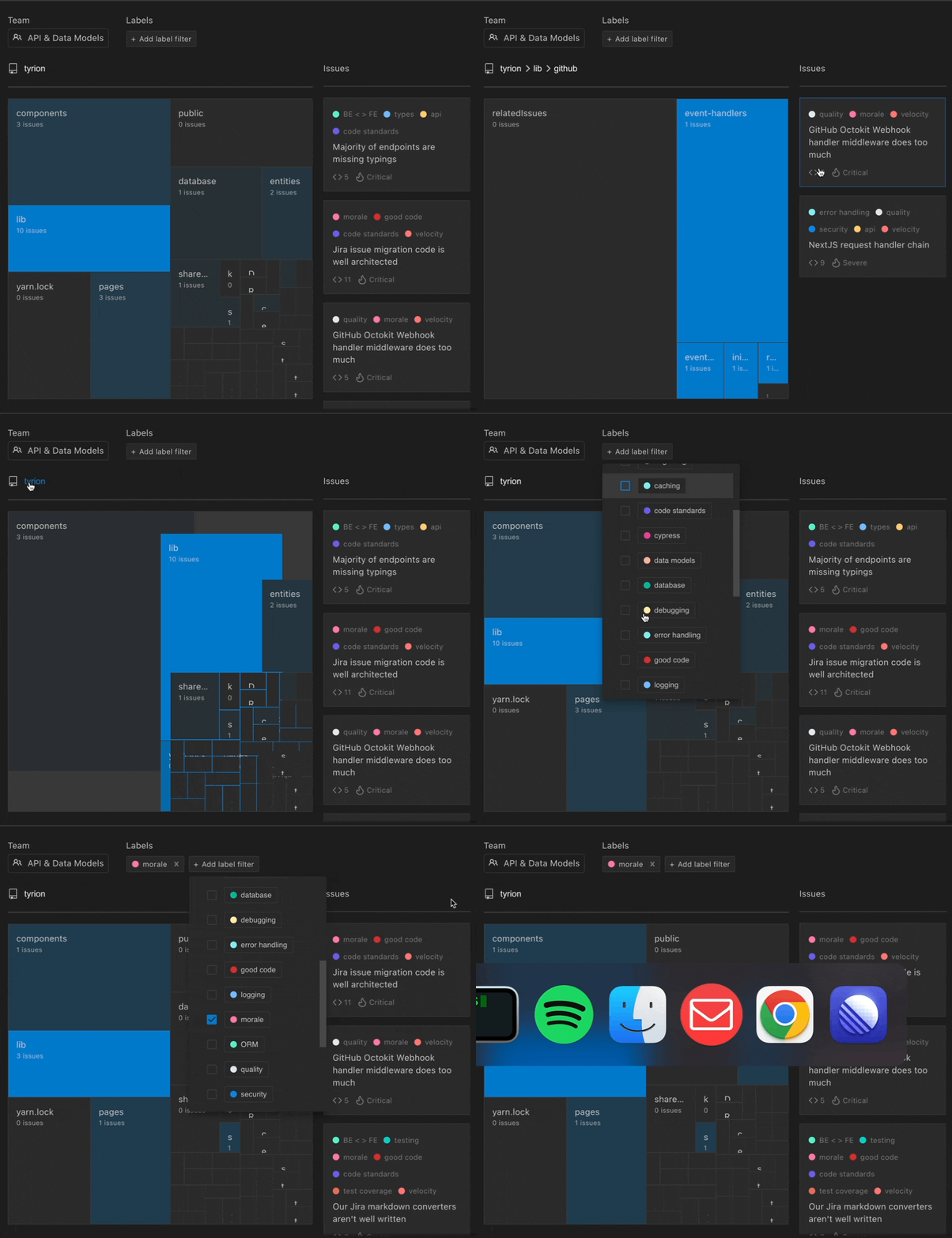
Use Stepsize’s visualisation tool to see the technical risks associated with different parts of your codebase.
### **Sprint planning**
Stepsize’s visualisation tool allows your team to visualise what tech debt exists in each part of your codebase. You can also filter by impact. This is powerful because it allows you to focus on particular themes. For example, you could focus on issues impacting *morale*, *velocity* or the *database*.
Fix issues regularly. Two methods you could use to achieve this include:
* Allocating 15-20% of resources to refactoring code and fixing bugs in every sprint cycle
* Allocating entire sprints to deal with tech debt regularly, such as every quarter
## **What next?**
Stepsize is a multiplayer tool that's radically more effective for teams than simply using a typical issue tracker.
Invite collaborators to explore Stepsize.